Voice and announcements
A voice calls your session out loud, from the countdown to the last round, so your phone can stay on the floor. You choose how loud it speaks and which announcements it makes.
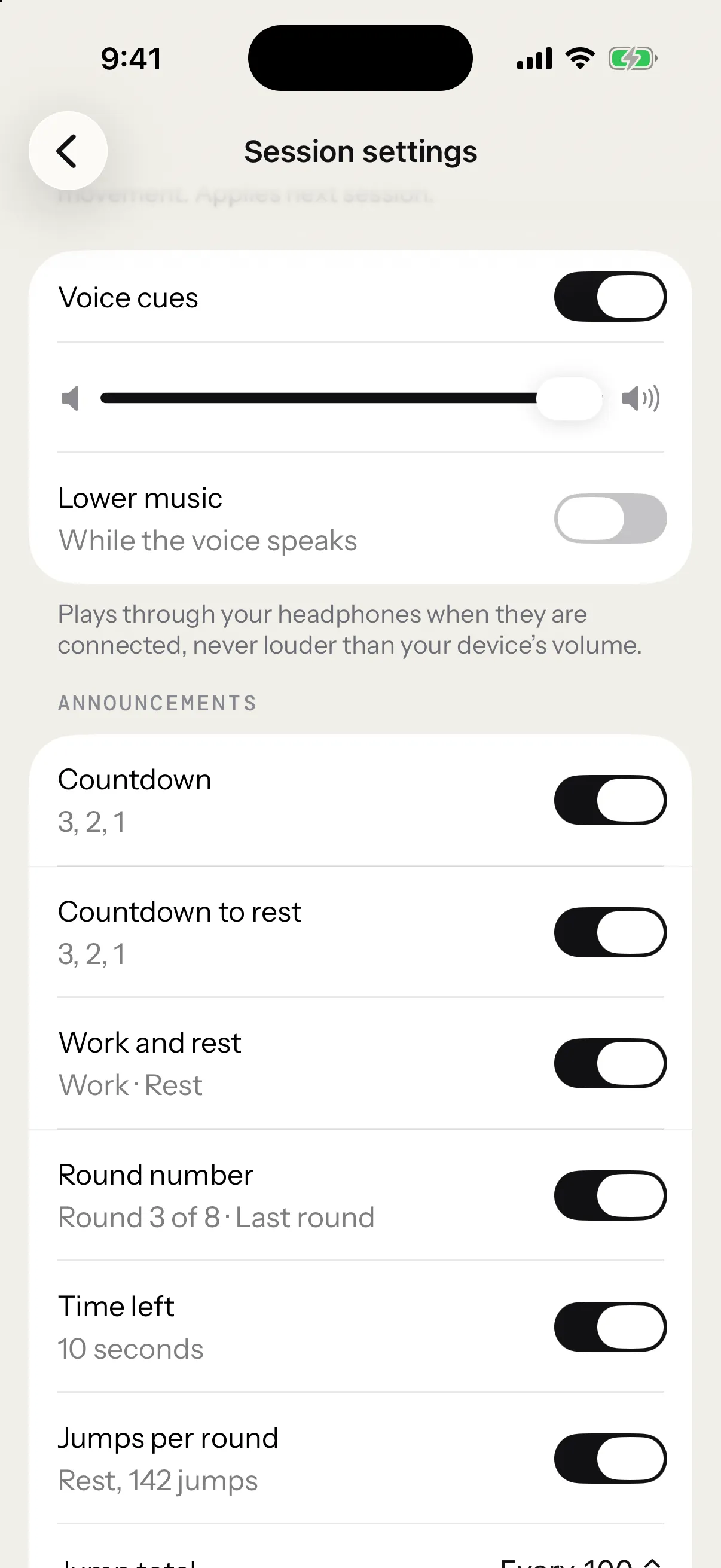
Turn the voice on or off
The voice settings live in Settings › Session settings. The Voice cues switch turns the voice on or off. It starts on.
The same page opens from the session setup screen: tap Session settings, above Start session.
With the voice off, the announcements leave the page.
Volume
The Volume slider sets the voice from 10 % to 100 % of your device’s volume. It never speaks louder than your device. It starts at 100 %.
Lift your finger from the slider and the voice says “3, 2, 1, Work” at the new level. On Apple Watch, it speaks once the volume stops moving. To silence the voice, turn off Voice cues.
Lower music
Lower music decides what your music does while the voice speaks. On, the music dips under the voice, then comes back. Off, the music keeps its level and the voice plays over it. It starts on.
The switch is on iPhone only. Apple Watch always lowers other audio while it speaks.
What the voice says
Under Announcements, each thing the voice can say has its own switch, in the order a session says them, with the two countdowns side by side. The line under each switch shows its exact words. Under Goal reached, it names Free Jump, the only session with a goal.
| Setting | What you hear | When |
|---|---|---|
| Countdown | “3, 2, 1” | Before the first round, and at the end of each rest that leads into another round |
| Countdown to rest | “3, 2, 1” | At the end of timed work: before its rest, at the end of the session, and into the next EMOM minute when its target isn’t met |
| Work and rest | “Work”, then “Rest” | As each work and each rest begins |
| Round number | “Round 3 of 8”, then “Last round” | As each round begins, in sessions with more than one round |
| Time left | “10 seconds” | When timed work of 20 s or more has 10 s left |
| Jumps per round | “142 jumps” | As the rest begins, after a round that ran on the clock |
| Jump total | “100 jumps” | Every 50, 100 or 200 jumps in the session |
| Goal reached | “Goal reached” | When Free Jump reaches your goal |
| End of session | “Session complete” | One second after the session ends |
The countdown before the first round lasts as long as you set under Session settings › Start, but the voice only says its last 3, 2, 1. With None, or with Start on first jump, the first round starts without a countdown. See the countdown.
Jump total is a picker rather than a switch: Every 50, Every 100 (where it starts), Every 200 or Off. In Free Jump, the goal’s announcement takes the place of a jump total that lands on the same jump.
When one moment has several announcements, the voice says them as one phrase: “Work, Round 3 of 8”, or “Rest, 142 jumps”.
Round calls in each format
- In an EMOM, the minute is the call to work: “Minute 3 of 10”, then “Last minute”.
- A Rising EMOM adds the minute’s target: “Minute 3 of 10, 30 jumps”.
- With Until you miss on, the minute comes without a total, since the first missed minute ends the session: “Minute 3, 30 jumps”.
- A pyramid says each round’s target: “Work, Round 2 of 5, 100 jumps”.
- A Skill session calls each round’s drill instead of “Work”: “Criss-cross, Round 2 of 6”.
- AMRAP, Free Jump and other one-round sessions get “Work”, with no round number.
Jumps per round speaks only after a round that ends on the clock. A round that ends on its jump target always reached it, and the screen already shows that number.
Time left needs work of at least 20 s, so the warning never lands on top of the call to work. In an EMOM, it comes only while the minute’s target is still ahead of you.
One phrase with its own setting
“Heart rate high” plays when your heart rate reaches your maximum. The High heart rate alert switch, lower on the same page, turns it on or off, along with its notice on screen. See zones and the alert.
Trips stay silent. The screen shows them.
Where you hear it
The voice plays through your headphones when they’re connected, and through the iPhone’s speaker when they aren’t.
It speaks the app’s language, English or French, as set in Settings › Language.
To know what keeps going when you lock your iPhone mid-session, see Off screen and on the Lock Screen.
On Apple Watch
The Watch app has its own Session settings page, at the bottom of its session list, with the same settings minus Lower music.
The voice speaks from the Watch, and the Watch taps your wrist too:
- a tap on 3, 2 and 1 of the countdown, and of the end of timed work when Countdown to rest is on
- one strong pulse when work starts
- a falling pair when rest starts
- a light double tap at each jump total and at Free Jump’s goal
- a pattern of its own when your heart rate runs high
- a success tap when the session ends
The taps stay the same whatever the voice says: the announcement switches change only the words. Jump total, Countdown to rest and High heart rate alert change the taps too. The taps at the end of timed work come with the voice, so turning off Voice cues stops them, while Jump total stays on the page for its taps. “10 seconds” has no tap.