Programs
A program lines up weeks of sessions. Follow one and Today always shows its next session. You set the pace: days are suggestions, and nothing expires.
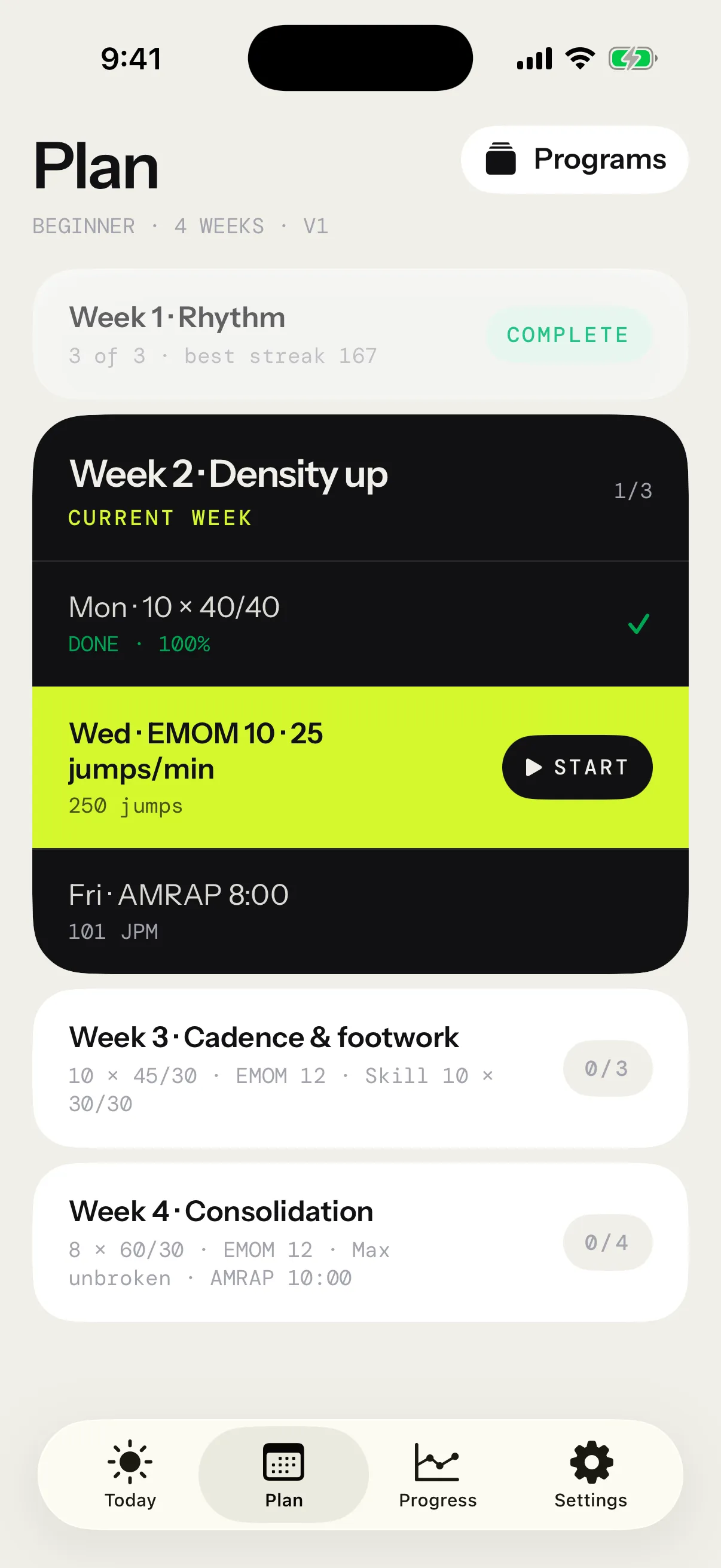
The Plan tab
Plan shows the program you follow, week by week. Weeks behind you are dimmed, with a check mark, the sessions done and your best streak. The current week shows its sessions in order, with the next one lit and its Start button. Weeks ahead list their sessions in short.
Tap a week to open it session by session. Programs, at the top, opens every program: the one you’re Following, the app’s own under Ready to follow, and yours under Mine.
The first time you open the app, its last welcome page asks whether to follow Beginner, which is chosen, or just jump. See The first launch.
Beginner and Intermediate
Two programs ship with the app. Each runs 4 weeks and 13 sessions, on Monday, Wednesday and Friday, with two sessions on the last Friday. Both are written for a baseline rope, and the rope in hand scales every session (see Rope scaling). The numbers below are the baseline.
Beginner
Free. It builds rhythm first, then density, cadence and footwork, and closes on two tests.
| Week | Monday | Wednesday | Friday |
|---|---|---|---|
| 1 · Rhythm | Intervals 8 × 30 s / 60 s | Intervals 8 × 30 s / 45 s | Density 8:00 |
| 2 · Density up | Intervals 10 × 40 s / 40 s | EMOM 10 · 25 jumps/min | AMRAP 8:00 |
| 3 · Cadence & footwork | Intervals 10 × 45 s / 30 s | EMOM 12 · 30 jumps/min | Skill 10 × 30 s / 30 s |
| 4 · Consolidation | Intervals 8 × 60 s / 30 s | EMOM 12 · 35 jumps/min | Max unbroken, then AMRAP 10:00 |
Intervals ask for 90 JPM in weeks 1 and 2, then 95 JPM. Week 2’s AMRAP aims for 90 JPM. Week 3’s skill session alternates Bounce and Alternate foot.
Intermediate
Pro. It picks up where Beginner ends: cadence 100, volume counted in jumps, footwork up to double unders, and a week of tests.
| Week | Monday | Wednesday | Friday |
|---|---|---|---|
| 1 · Cadence 100 | Intervals 10 × 60 s / 30 s | EMOM 12 · 40 jumps/min | Density 12:00 |
| 2 · Volume | Jump intervals 10 × 100 / 30 s | Pyramid 50 → 200 → 50 | AMRAP 12:00 |
| 3 · Footwork | Intervals 12 × 45 s / 15 s | EMOM 14 · 50 jumps/min | Skill 12 × 30 s / 30 s |
| 4 · Tests | Intervals 8 × 90 s / 30 s | Death by 30 +5 | Max unbroken, then AMRAP 12:00 |
Intervals ask for 100 JPM in week 1, then 105 JPM. Week 3’s skill session cycles through Boxer step, High knees, Criss-cross and Double under. Week 4’s Death by lasts 20 minutes at most, and its AMRAP repeats week 2’s so you can compare.
Without Pro, Intermediate wears a lock: Follow this program opens the Pro page, and the program is followed as soon as Pro is yours.
Follow a program
- On Plan, tap Programs.
- Tap a program to open its page.
- Tap Follow this program.
Plan then opens on it. You follow one program at a time, and following another switches Plan and Today to it. A program you followed before picks up where you left it: its button reads Follow again, where you left off. To follow none, tap Stop following on the program’s page.
On Today, the program’s card has a ⋯ menu: See the program, Change program and Stop following, which keeps your progress. Without a program, Today shows Follow a program and Build your own. Building one starts from a copy of Beginner or Intermediate, a Blank page, or Have your AI write one, and needs Pro.
The Apple Watch shows the next session of the program you follow at the top of its list, and Count with › Apple Watch on an iPhone’s start screen sends any session there. Sessions done on the Watch count. On the Watch, every session except Free Jump needs Pro, Beginner’s included.
The Training program widget puts your next session on the Home Screen: tap it to open its start screen. See Widget.
Your pace
- The next session is the first one not done, in the program’s order.
- The day beside a session is a suggestion, never a deadline.
- You can run any session in any order from Plan or from a week’s page. Sessions done out of order still count.
- Any attempt you save marks a session done, however it went, even one you end early. The app keeps every session that counts at least one jump.
- A session counts when you start it from the program: Today’s card, Plan, a week’s page, From the plan on Sessions, or the top of the Watch’s list. The same workout started from My workouts doesn’t count.
- Only sessions since you started following count. Deleting a session in Progress takes it out of the program too.
A program also sets your weekly goal, and its reminders name your next session. See With a program.
A week, session by session
Tap a week on Plan to see each session’s day, format and numbers on the rope in hand. Up next marks the next one. Tap a session to open its start screen.
A done session shows how it went, such as Done · 94% · Streak 64, and See session opens its report. Run a session again and the most complete attempt shows.
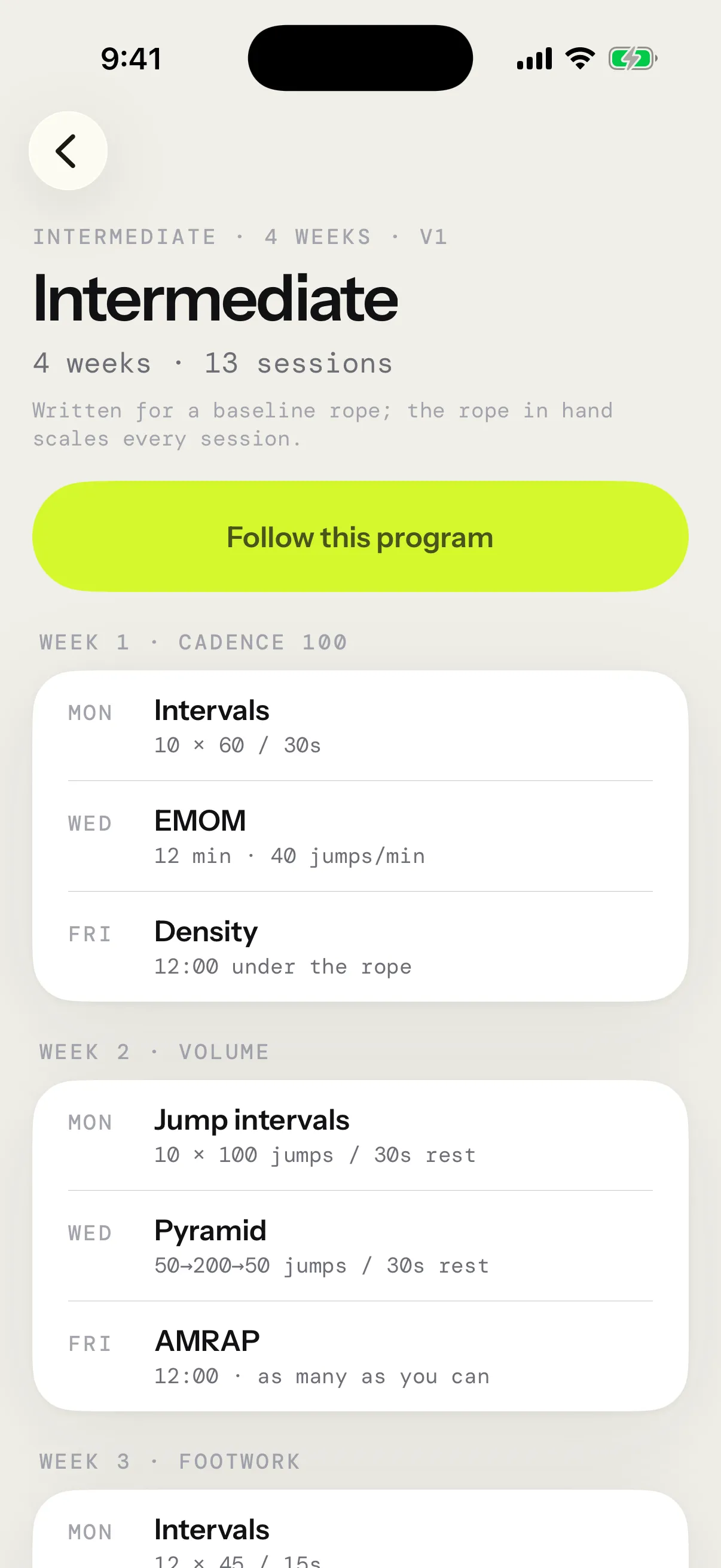
A program’s page lists every week and session, with the numbers on your rope. It’s also where you follow a program, copy it, start it over or stop following it.
How a session counts
A session’s percentage counts rounds: the rounds or minutes you completed, out of the total. Density compares your time under the rope with its target instead. A target cadence guides your pace and is never scored. AMRAP, Death by and the Max unbroken test show no percentage, since their jumps, minutes held and run are the score. Session formats has the details.
When you finish
Once every session is done, Plan and Today show Program complete. After Beginner, Next: Intermediate opens Intermediate’s page. After any other program, What’s next opens the list of programs. Start over runs the program again from its first session.
You can start over at any time: on the page of the program you follow, tap Start over and confirm. The sessions you already did are kept, and the program counts again from that day.
Your own programs
Create a program
- On Plan, tap Programs, then Create a program.
- Give it a Name, and name each week if you like.
- Tap Add a session, then Build a session to use the creator, or From My workouts to copy one of your workouts.
- Tap Add a week for each week after the first. A program holds up to 24 weeks, and a week up to 7 sessions.
- Tap Save program.
Its page opens next: tap Follow this program to start it.
- Tap the day square on a session to suggest a day, or pick No day.
- Touch and hold a session for Duplicate, Move up, Move down and Remove session.
- The … beside a week holds Duplicate week, Move up, Move down and Remove week.
- A session taken from My workouts is a copy. Changing or deleting that workout later leaves the program as it is.
- Weeks with no session are left out when you save, and a program needs at least one session.
- Closing the editor with unsaved changes asks first. Discard changes throws them away.
Copy a built-in program
On Beginner’s or Intermediate’s page, tap Copy to make it yours. The editor opens on a copy, weeks and sessions included, named like Beginner (copy). Change what you like, then save. On a program of your own, the same button reads Duplicate.
A copy runs as written: the rope in hand no longer scales it.
Edit or delete
On your program’s page, tap Edit at the top right. Delete program sits at the bottom of the page and of the editor. Its sessions are kept.
Share a program
On your program’s page, tap Share program. The app sends a copy to jumpropeprotocol.app, then the share sheet opens with a short link, like jumpropeprotocol.app/p/k7Qf3aB2xZ. On an iPhone with the app, the link opens the program in the editor as Imported program, ready to save; without Pro, Pro’s page opens first. Anyone else sees the program on the site. The link holds the program as it was when you shared it, and sharing needs a connection. A program over 24 weeks, or with more than 7 sessions in a week, can’t be shared. See what a shared copy holds.
Import one an AI wrote
On Programs, Have your AI write one opens Connect your AI. Ask your assistant, like Claude, Grok or ChatGPT, for a program and it sends you a link. Tap the link on your iPhone: the program opens in the editor as Imported program, on Plan. Nothing is kept until you tap Save program. If a session is running, the editor waits for it to end. A link with more than 24 weeks, or more than 7 sessions in a week, doesn’t open, and any number outside the creator’s limits comes back inside them.
Connect your AI shows how to set it up.
Progression
Only Beginner and Intermediate adapt. Your own programs, copies and imports run as written. Each session looks at the last session of the same kind in an earlier week: the last EMOM sets the next EMOM, and the last intervals set the next intervals. Week 1 runs as written. The rules are fixed, never guessed.
A session counts as reached at 80%. EMOMs count minutes made, jump intervals and pyramids count rounds done, and timed intervals count jumps done against the jumps asked at the target cadence for the session as it ran on your rope. Density counts time under the rope. AMRAPs and skill sessions have no target to reach.
| Your last session of that kind | The next one |
|---|---|
| Reached 80% | Runs as written with jump targets +5%, at least one jump and at most 50 more per session in Beginner, 100 in Intermediate |
| Intervals finished in full, at 80% or better, with at most 1 trip per 100 jumps | Rests −5 s, never under 10 s |
| Fell short of 80% | Repeats the missed session until you reach it, then moves on one step behind the written plan |
More than 3 trips per 100 jumps over a week, counted over at least 100 jumps, makes the next week 20% lighter: fewer interval and skill rounds, lower jump targets, and shorter AMRAP and density clocks. Rests stay. Only intervals, EMOMs and pyramids count trips, since they set your rests. A pause in Density, an AMRAP or Free Jump is yours to take, and skill drills trip by design.
A lighter week adds nothing: no +5% and no shorter rests. What you reach in it raises nothing, but a miss still repeats.
Tests always run as written and count for nothing: Max unbroken, Death by, the test-day AMRAP and Intermediate’s week-2 AMRAP, which week 4 takes again.
On Today, the session’s card shows how last time went and what it changed, or what this session needs for the next one to move on. The numbers are already on your rope: progression first, then rope scaling.
Rope scaling
Beginner and Intermediate are written for a baseline rope, and the rope in hand scales every session. When your rope changes a session, Today’s card says how, with Why? for the details. Your own programs, copies and imports run as written, like the workouts you build. Ropes has the numbers.