Heart rate
Heart rate comes from a Bluetooth chest strap you pair with the app. With one on, you get your live BPM and its zone, and an alert when you reach your max.
Compatible straps
The app works with the Polar H10 and with any strap that uses the standard Bluetooth heart-rate service. It remembers one strap on each device.
If your strap reports its battery, the app shows it once the strap is paired.
Pair a strap
Most straps sleep until they touch skin, so put yours on before you pair it.
- Wet the electrodes and put the strap on.
- Open Settings › Sensors and tap the strap card, which reads No strap paired, with Pair. On the session setup screen, the strap row opens the same sheet.
- The first time, iOS asks to let the app use Bluetooth. Allow it.
- Under Straps in range, tap Pair next to your strap.
Your strap’s name moves to the top of the sheet, and your heart rate shows in large type as soon as it reads. Reading means the beats are coming in.
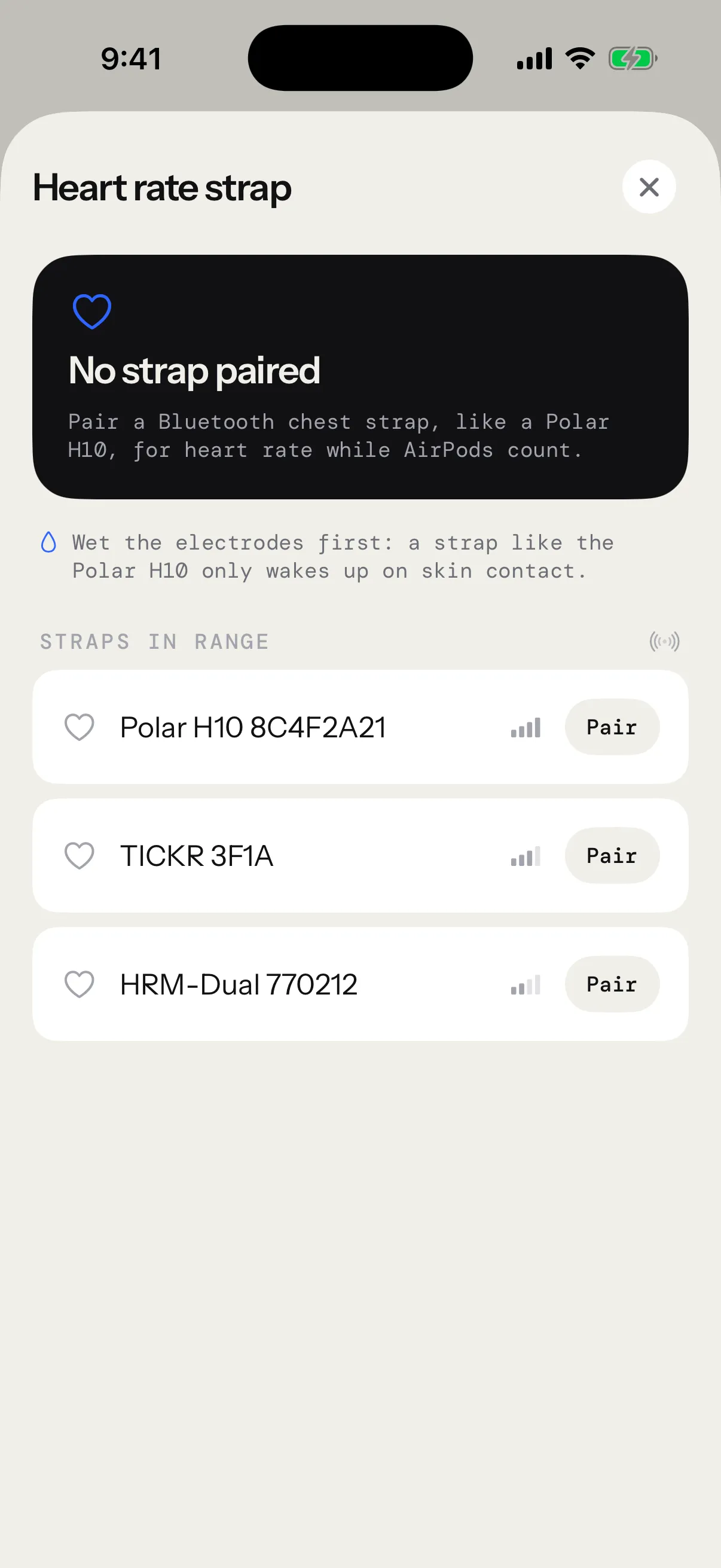
What the sheet shows
- The live reading, or “—” while no beat comes in.
- A status: Reading, Searching while it waits for the strap, or No contact when the strap is connected but can’t feel your skin.
- The strap’s battery, when it reports it. Below 20 % it turns orange: “Battery 15% · replace it soon”.
- Straps in range, nearest first, with their signal.
- Forget this strap, to remove it.
Pairing another strap replaces the first one. A strap your iPhone already uses with another app shows up in the list too.
Once paired, the strap connects by itself whenever the app needs it. Wet the electrodes, put it on, and it joins.
When it doesn’t connect
| You see | What to do |
|---|---|
| Searching | Put the strap on and wet the electrodes. It connects on its own. |
| No contact | Wet the electrodes again and snug the strap. |
| Bluetooth is off | Turn Bluetooth on in Control Center. |
| Bluetooth access is off | Tap Open Settings and turn on Bluetooth for the app. |
During a session
Your heart rate sits in the bottom row of the live screen, next to calories, with a badge for your zone, like Z3. On Apple Watch, BPM is at the foot of the work and rest screens, and its label carries the zone, like “BPM · Z3”.
If no beat arrives for 10 seconds, BPM shows “—” and the session goes on. Time in zones stops adding up until the strap reads again. Nothing pauses.
On the pause screen, a small arrow next to BPM shows how far your heart rate has dropped during the pause.
Zones and the alert
The app splits your heart rate into five zones, each a share of your maximum heart rate:
| Zone | Share of your max | With a max of 190 BPM |
|---|---|---|
| Z1 | 50 to 60 % | 95 to 113 |
| Z2 | 60 to 70 % | 114 to 132 |
| Z3 | 70 to 80 % | 133 to 151 |
| Z4 | 80 to 90 % | 152 to 170 |
| Z5 | 90 % and up | 171 and up |
Below 50 %, your heart rate counts in no zone.
Set your maximum in Settings › Session settings, under Max heart rate: from 120 to 220 BPM, 190 to start.
With High heart rate alert on, reaching your max during work shows “Heart rate high · 192” on screen for 3 seconds. The voice says “Heart rate high” whenever you reach it, in a rest too, and a session on Apple Watch taps your wrist. The alert fires once, then waits until your heart rate drops more than 5 BPM below your max before it can fire again. The session keeps running.
A new max applies from your next session. Each saved session keeps the zones it ran with.
On Apple Watch
Apple Watch reads your heart rate from its own sensor during a session. A strap paired with the Watch takes over while it reads, and the wrist takes back over when it stops. A Bluetooth pairing belongs to one device, so pair your strap on the Watch too.
- Wet the electrodes and put the strap on.
- Open JRProtocol on your Apple Watch and scroll the session list to Heart rate strap.
- Tap your strap under Straps in range.
The strap paired on your iPhone feeds sessions counted on the iPhone. The one paired on your Watch feeds sessions on the Watch. On the iPhone, heart rate comes from a strap only: without one, BPM stays at “—”.
The Watch keeps its own Max heart rate and High heart rate alert, on its Session settings page.
After the session
When a strap or your Apple Watch read your heart rate, the session’s report shows a heart-rate card. On the iPhone, the summary shows it as soon as the session ends:
- Your average heart rate, and its curve over the five zones. Drag a finger along the curve to read any moment.
- Max BPM, Recovery 30 s and Time in Z4–5. Recovery is how far your heart rate falls in the first 30 seconds of a rest.
- The time you spent in each zone, and the strap that measured it.
The Watch’s own summary keeps to your average and max BPM and your time in each zone. The whole card waits in the session’s report on your iPhone, in Progress › Sessions, like every session’s. See session reports.
The Cardio card in Progress follows your minutes in each zone and your recovery, week after week. See Progress.
With Apple Health connected, each reading is saved with the session’s workout. See Apple Health.