The live session
Once you tap Start session, the live screen takes over: one big number, readable from the floor. Tap anywhere to pause. Ending takes a long press, so a stray tap never ends your session.
The countdown
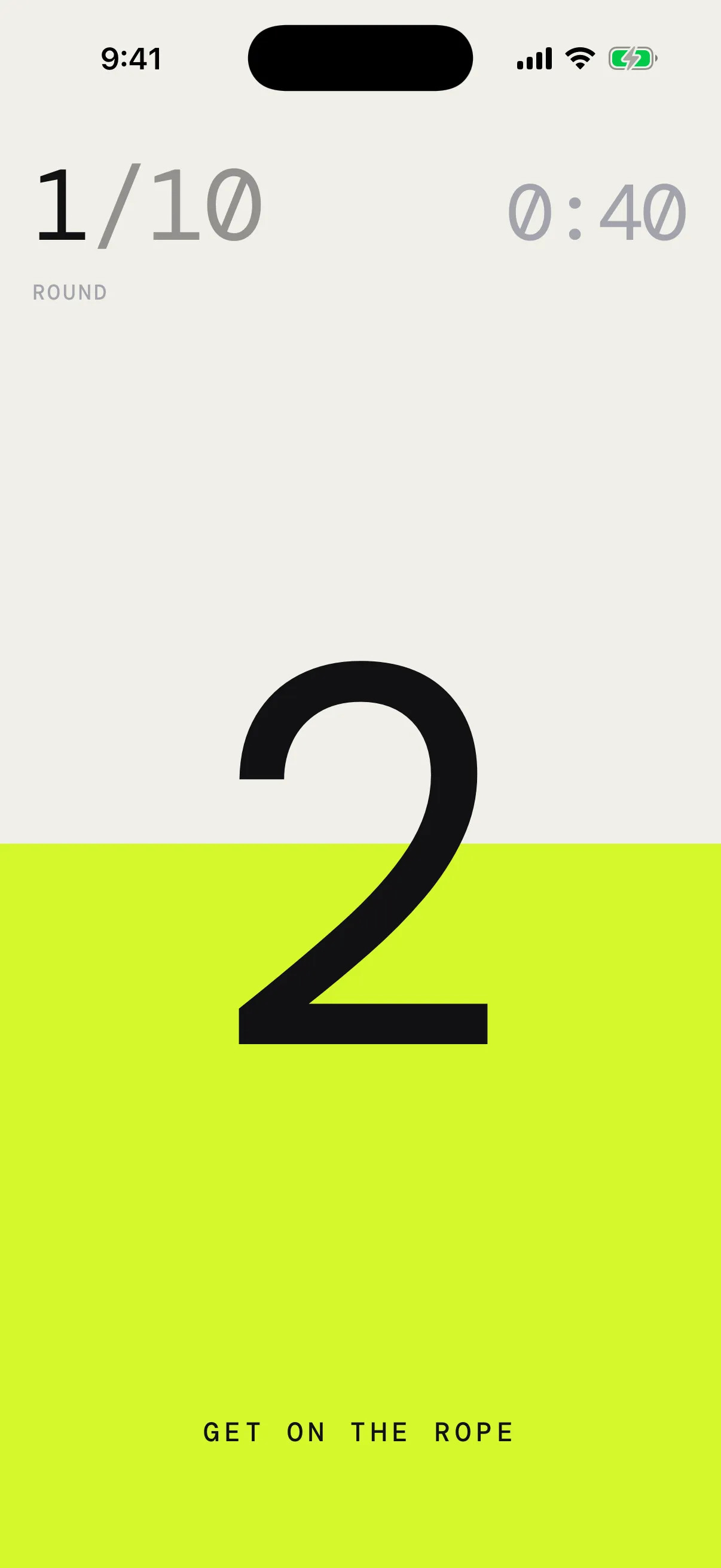
A beat after Start session, the countdown runs in huge type while lime rises from the bottom of the screen. Get on the rope sits under it, and the work screen’s header already waits at the top, unlit. When the screen is full, work begins. With the countdown announcement on, the voice says 3, 2, 1. See Voice and announcements.
The countdown starts at 3. To change it, open Session settings and pick a Countdown under Start: None, or 3, 5, 10, 15 or 30 seconds. With None, work starts at once. A longer countdown starts from its own number, and the voice still only says the last 3, 2, 1.
Start on your first jump
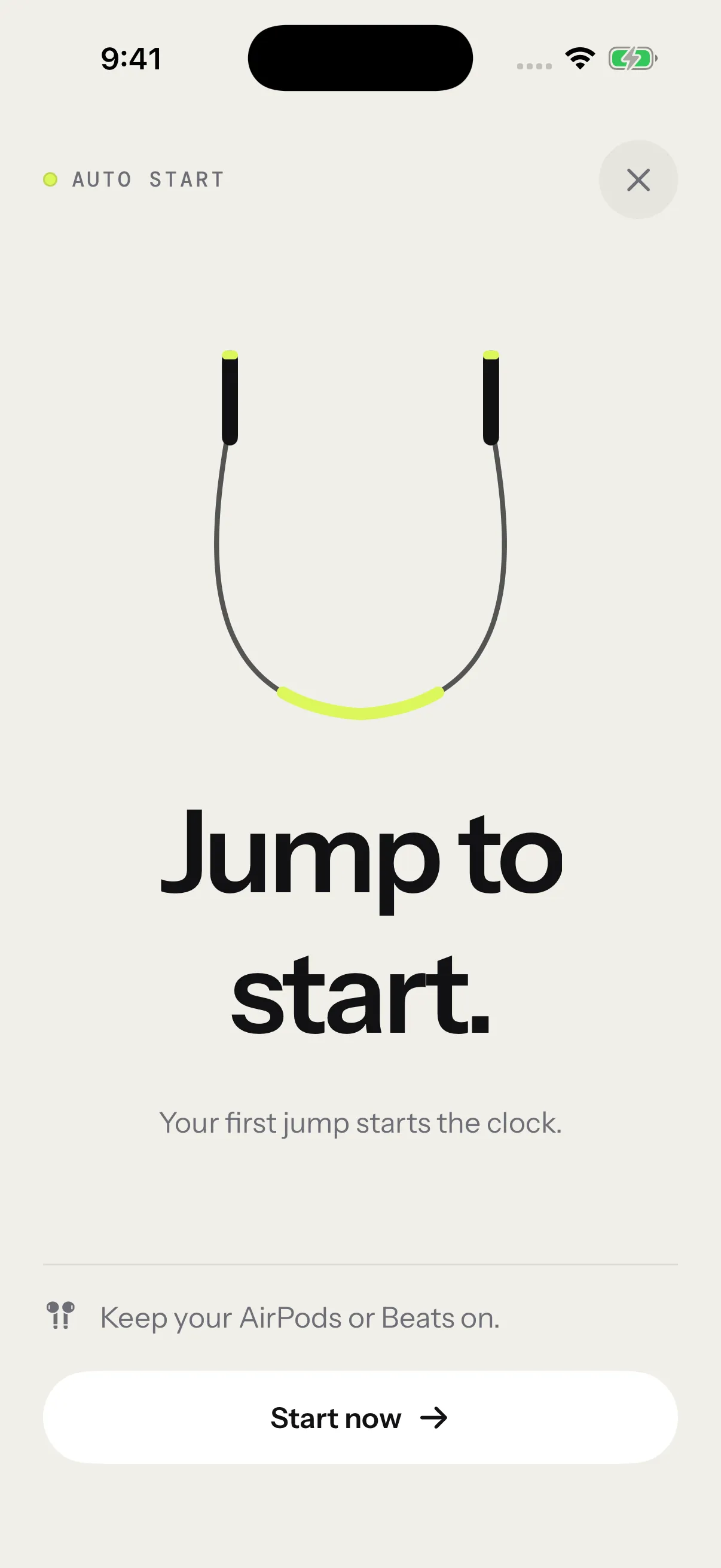
Turn on Start on first jump under Start in Session settings. There’s no countdown then: the app waits while you get ready, and your first detected jump starts the clock. You can also tap Start now, or × to call the session off.
During work
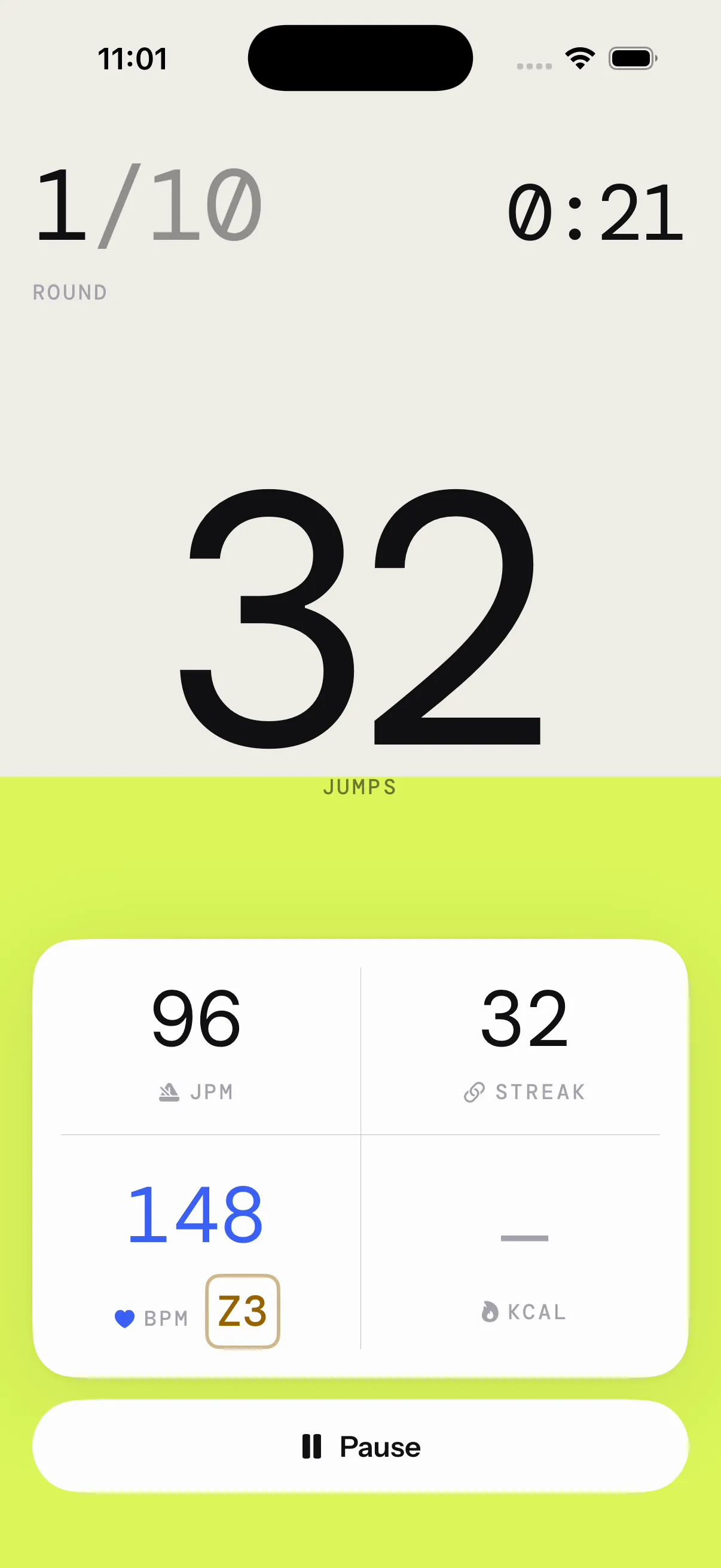
- Top left, the round in large type, like 3/10, with Round or Minute under it. Sessions without rounds show their name instead, like Free Jump or AMRAP.
- Top right, the clock with the time left. Free Jump counts the time spent instead. Rounds that end on a jump count have no clock.
- In the middle, the count. With a jump target, it counts this round’s jumps toward the target. Otherwise it shows the session’s total.
- Behind everything, the tide: lime rises as the round goes on, with each jump toward a target or with the clock. When the screen is full, the round is done.
- Under the count, the grid: JPM (your pace right now), Streak (jumps in a row), BPM (your heart rate, with a badge for its zone, like Z3) and KCAL (calories).
- At the bottom, Pause.
Without a strap, BPM shows “—”. Calories carry a “~” because they’re an estimate, and show “—” without your weight. See Heart rate and Calories.
During rest
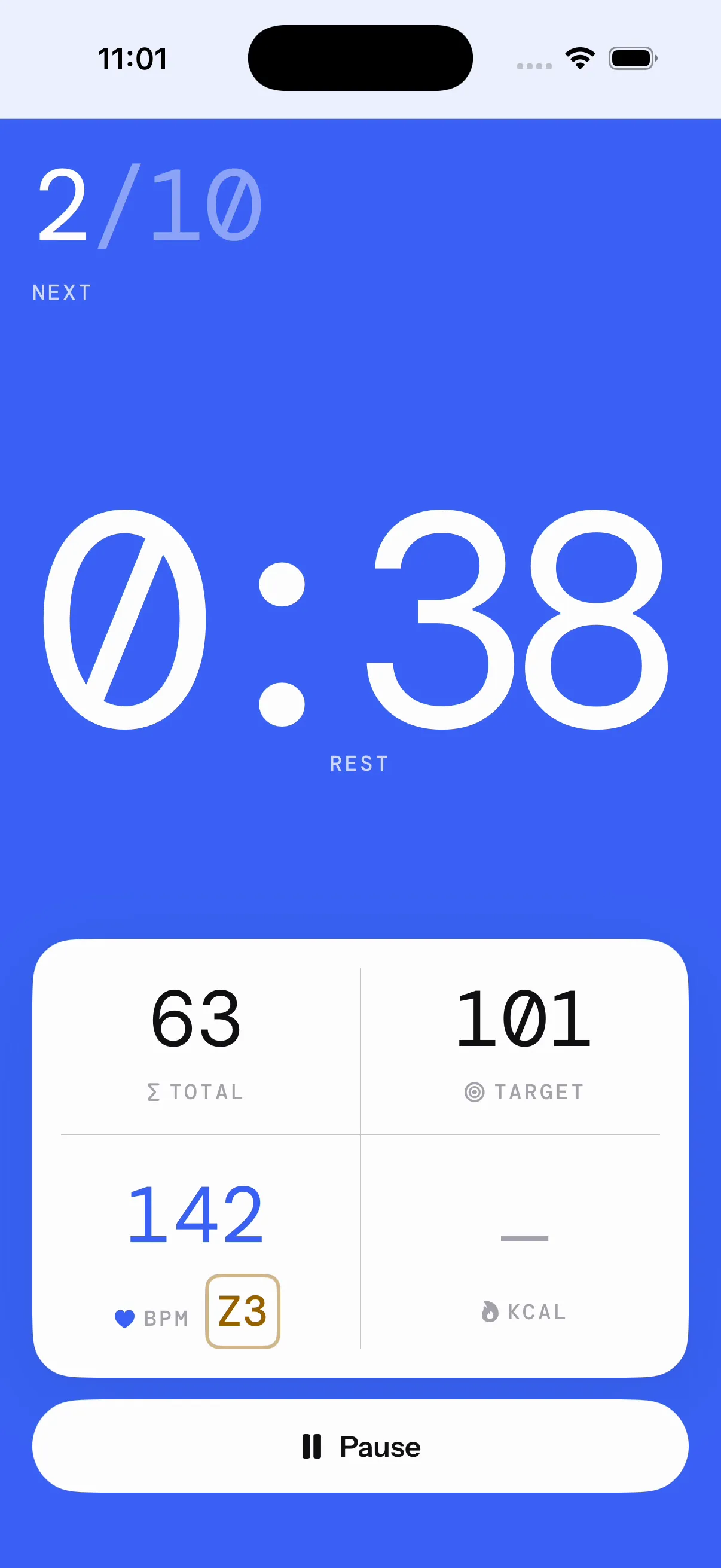
Rest turns the screen blue. The blue floods in, then drains as the rest runs out.
- Top left, the next round, with Next under it, or Next · finish when only the end is left.
- In the middle, the rest timer in huge type.
- Under it, the grid: Total (your jumps so far) and Target (what the next round asks for: a number of jumps, or a pace in JPM), over the same BPM and KCAL.
With the countdown announcement on, the voice counts the last 3 seconds into the next round.
Notices
A notice can show for a moment above the count. It never covers the number.
- Trip · streak over and Clock keeps running: a gap of 1.5 s or more between two jumps. See Trips and streaks.
- Heart rate high, with your BPM: your heart rate reached the max set in Settings › Session settings. It shows during work, while the voice calls it in a rest too. It comes back each time you reach it. See Heart rate.
- If your headphones stop sending motion, the session pauses itself and the pause screen shows Counting paused. See When your headphones disconnect.
Pause and resume
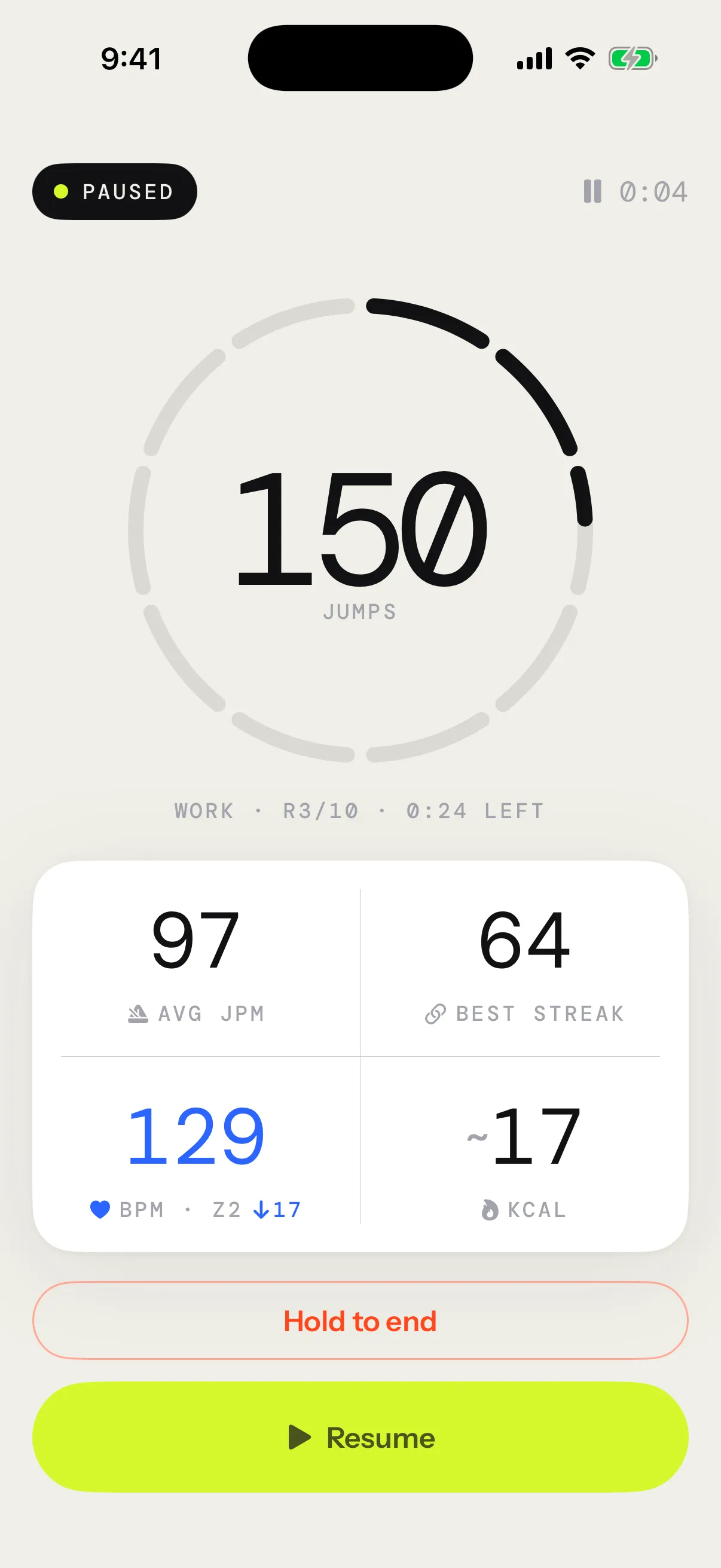
Tap anywhere on the screen, or tap Pause. The clock stops, and so does the round. You can pause during the countdown or a rest too.
The pause screen shows:
- Paused, and how long you’ve been paused
- Your count inside a ring with one arc per round or minute: full for the ones done, grey for the ones missed, part-filled for the one under way
- A line that says where the session stands: the phase, the round and the time left
- Avg JPM, Best streak, BPM and KCAL. While you get your breath back, BPM also shows how far your heart rate has dropped since you paused.
Tap Resume to carry on. Work picks up where it stopped, with no new countdown. A pause ends your streak without counting a trip.
Leaving the app can pause the session too: see Off screen and on the Lock Screen.
End a session
Most sessions end by themselves:
- After the last round or minute
- When an AMRAP’s clock runs out
- When a Density session reaches its time under the rope
- At the first missed minute of a Death by
- At the first trip of a Max unbroken test, once your run has reached 10 jumps
Free Jump runs until you end it, and keeps counting past its goal.
To end a session yourself:
- Tap the screen to pause.
- Press and hold Hold to end until it fills, a little under a second.
Ending early
Stop before the end and the summary says Session ended, with how much you did, like Jumps · 60% of target.
The percentage counts the rounds or minutes you completed out of the total, whatever your pace. An EMOM minute that runs out before its target counts as missed.
- Free Jump with a goal: your jumps out of the goal.
- Density: your time under the rope out of the target.
- AMRAP, Death by and Max unbroken: your jumps, with no percentage.
Free Jump and Max unbroken never count as ended early. More on each format in Session formats.
The summary
When the session ends, the summary takes over:
- The session’s name and date, and your jumps in huge type
- Duration, Avg JPM and KCAL
- The badges the session earned. See Badges.
- With Pro, the records you broke and how this session compares with the last time you did it
- Cards for heart rate, cadence, rounds and unbroken runs, then the rope and what counted your jumps. Tap the rope to change it if you jumped with another one.
- Whether the session is Kept in history and Saved to Health. If Apple Health isn’t connected yet, Connect sits beside it.
Tap the share button, beside Done, to send a picture of your session, or Done to go back to the app. Discard, under them, removes the session from your history, and its workout from Apple Health, once you confirm. A session with no jumps isn’t kept, and the summary says so. Everything else is in Session reports and sharing.