Ropes
Tell the app which rope you’re holding. In the built-in programs, its weight scales cadence, jumps and rest, for the same training effect with honest targets.
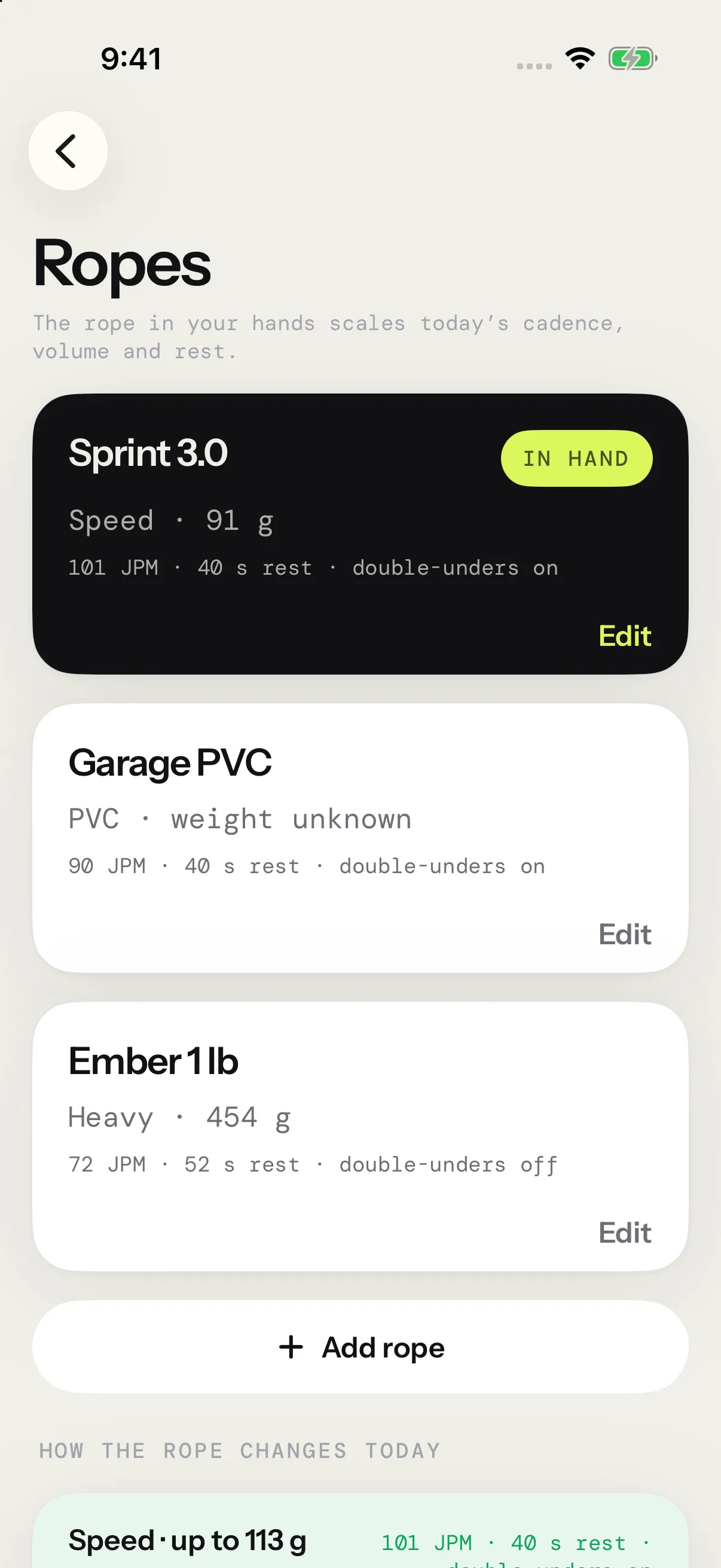
Open Ropes
On Today, tap the rope button beside the title. It shows the name of the rope in hand, or Add your rope when you have none. Manage ropes, on the Rope scaling screen, opens Ropes too.
Add a rope
- On Ropes, tap Add rope.
- Give the rope a Name of your choice.
- Pick its Type: Speed, PVC, Beaded, Heavy, Weighted handles or Other.
- Pick its Weight, or Not sure.
- Tap Save.
- The main weight choices are 1/4, 1/2, 3/4, 1, 1 1/2, 2, 3, 4 and 5 lb, each with its metric equivalent. More weights (oz) adds 1, 2, 2.5, 3, 5, 6 and 9 oz. Once a weight is set, a stepper fine-tunes it by 0.05 lb or 10 g, from 0.05 lb to 5 lb (20 g to 2.27 kg).
- At the top of the sheet, the rope’s card shows it as Ropes will, with what a sample session asks on it. The line under the card says how the rope will scale.
- Until you pick a type yourself, the weight suggests one: 0.5 lb and up suggests Heavy. Picking Heavy or Weighted handles with no weight sets it to 1 lb, since that’s how it scales anyway.
- Notes holds the rest: cable, length, handles.
- Save waits until the rope has a name.
Your first rope becomes the rope in hand.
Choose the rope in hand
Tap a rope’s card to hold it: the card shows In hand. The rope in hand goes with every session you start, unless you pick another rope for a workout: tap the rope card on its start screen. That workout keeps your pick, and the rope in hand stays the same. Each session remembers its rope, name and weight, so Progress can show your numbers rope by rope.
Jumped with another rope? Tap Rope on the session’s report, on the summary or later in Progress › Sessions, and pick the one you used, or No rope. See Session reports.
With no rope, sessions run at the plan’s baseline, and the start screen says No rope set · baseline targets. If you delete the rope in hand, your oldest rope takes over.
How scaling works
Beginner and Intermediate are written for a baseline rope. When you hold another one, each of their sessions adjusts to the rope’s weight. Weight decides first, whatever the type.
| Rope in hand | Cadence | Jump targets | Rest | Double-unders |
|---|---|---|---|---|
| Speed rope under 0.5 lb | +12% | As written | As written | On |
| Any other rope under 0.5 lb | As written | As written | As written | On |
| 0.5 lb (227 g) up to 1 lb | −10% | −10% | +8 s | Limited |
| 1 lb (454 g) and up | −20% | −20% | +12 s | Off |
With no weight, the type decides. A Speed rope still gets the +12% cadence. Heavy and Weighted handles get the 1 lb targets, the safer guess. Any other type runs as written.
For example, week 2’s Monday in Beginner asks for 10 × 40 s at 90 JPM with 40 s of rest, 600 jumps in all. On a 1 lb rope, it asks for 72 JPM and 52 s of rest, 480 jumps in all. On a speed rope, it asks for 101 JPM.
What changes, format by format:
- A target cadence moves in every format that has one.
- Jump targets move in jump intervals, EMOM and rising EMOM minutes, and pyramid rounds.
- Rest grows after each round of HIIT, jump intervals, pyramid and skill. EMOM rest stays what’s left of the minute.
- AMRAP, density and the Max unbroken test keep their clock or their run. Only a target cadence moves.
- Double-unders are advice: the app shows them on, limited or off. A skill session still keeps its Double under rounds.
Where you see it:
- On Ropes, each rope’s card shows what a sample interval session asks on it. How the rope changes today lays out that session on every kind of rope, with the rope in hand highlighted.
- When your rope changes the next session of your program, Today’s card says how. Why? opens Rope scaling: that session with a switch for Speed, PVC, Heavy and Very heavy ropes, then Manage ropes.
- The start screen shows the session’s rope and the cadence it asks for.
What never scales
Workouts you build, Today’s quick starts and Free Jump run as written, whatever rope you hold. So do your own programs, including copies of the built-in ones and imports. Their page says they run as written.
Kilograms or pounds
Saved rope weights and the editor’s stepper follow Units in Settings › Profile, the same setting as your body weight. In pounds, a rope reads like 0.5 lb. In kilograms, it reads in grams up to 1 kg, then in kilograms: 227 g, 1.36 kg. The preset buttons always show both imperial and metric weights, so you can recognize the weight printed on your rope. Switching units only changes how weights read. Each rope keeps the weight you gave it.
Until you choose, the unit follows Apple Health, or your region when Health has none.
How many ropes
Without Pro, Add rope opens the Pro page once you have a rope.
Edit or delete a rope
Tap Edit on a rope’s card. Delete rope sits at the bottom of the editor. Past sessions keep the rope’s name and weight.